Speed up widget development with Sitefinity MCP server. Learn more...

Configure your website scalability

To ensure your Sitefinity website scales accordingly and can handle peaks in user load you can leverage the Azure App Service scalability functionality. You can manually specify the number of instances your website runs on, or setup auto scale rules based on predefined conditions. To configure scalability for your website in App Service, perform the following:

  1. Navigate to the Azure Portal.
  2. Go to App Services and click on your website App Service in the list of available App Services.
  3. From the navigation menu select Scale out (App Service plan).
  4. Select Manual scale and use the slider to define the number of instances your website should run on. Alternatively, you can use the Custom autoscale option and define rules for auto scaling.
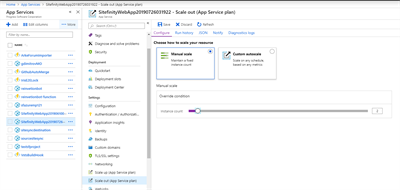
    Configure_AppService_Scalability


NEW TO SITEFINITY?

Want to learn more?

Enhance your Sitefinity skills by enrolling in free training sessions. Become Sitefinity certified through Progress Education Community to strengthen your professional credentials.

Get started with Integration Hub | Sitefinity Cloud

This free lesson teaches administrators, marketers, and other business professionals how to use the Integration hub service to create automated workflows between Sitefinity and other business systems.

Web Security for Sitefinity Administrators

This free lesson teaches administrators the basics about protecting your Sitefinity instance and its sites from external threats. Configure HTTPS, SSL, allow lists for trusted sites, and cookie security, among others.

Foundations of Sitefinity ASP.NET Core Development

The free on-demand video course teaches developers how to use Sitefinity ASP.NET Core and take advantage of its decoupled architecture and modern development model.

Was this article helpful?