Speed up widget development with Sitefinity MCP server. Learn more...

Headless API reference

The fully documented content delivery and management API of your RESTful service is created dynamically when you create your service. The API documentation of each service contains information about the types that you have included in your service, for both built-in and dynamic types.

You can access it on demand via the User Interface of your Sitefinity CMS instance.

To access the Content service API, you need to:

  1. Setup a RESTful service.
    For more information, see Setup a service.
  2. In Sitefinity CMS backend, navigate to Administration » Web services.
  3. Locate the service that you have created and click its Use in your app link.
    In the left pane, you can see all the types that are included in your web service.
  4. Click a type to display all available information for each type of request.
    The information includes query string, URI parameters, resource description, resource format, and more.

Following is a sample snippet of the GET Images API:
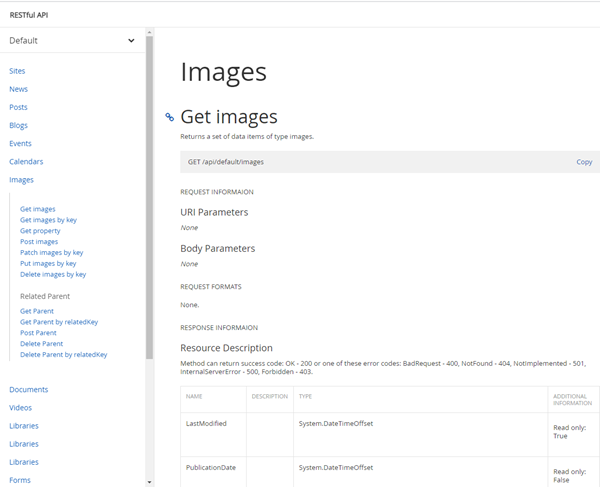
RESTful

NOTE: You can also access the API documentaion via /<route-URL>/<your-service-URL>/sfhelp

NEW TO SITEFINITY?

Want to learn more?

Enhance your Sitefinity skills by enrolling in free training sessions. Become Sitefinity certified through Progress Education Community to strengthen your professional credentials.

Get started with Integration Hub | Sitefinity Cloud

This free lesson teaches administrators, marketers, and other business professionals how to use the Integration hub service to create automated workflows between Sitefinity and other business systems.

Web Security for Sitefinity Administrators

This free lesson teaches administrators the basics about protecting your Sitefinity instance and its sites from external threats. Configure HTTPS, SSL, allow lists for trusted sites, and cookie security, among others.

Foundations of Sitefinity ASP.NET Core Development

The free on-demand video course teaches developers how to use Sitefinity ASP.NET Core and take advantage of its decoupled architecture and modern development model.

Was this article helpful?