Speed up widget development with Sitefinity MCP server. Learn more...

Themes

In Sitefinity CMS themes are part of the Web Forms and hybrid page templates. You can set custom colors, images, and styles for the different layout templates.

NOTE: Themes do not apply to pure MVC page templates. 

The following is a simple scheme of a theme’s folder content:
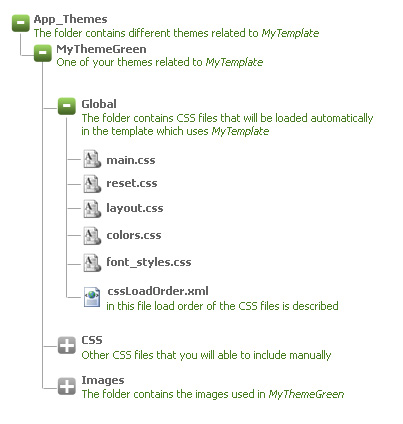
NOTE: Folder Global is mandatory. If the folder is missing it is not possible to register or load the theme.

NOTE: You can place your theme files in the root folder (~/App_Themes/ThemeName) as it is in ASP.NET convention, but all of your CSS files will be loaded no matter in which folder they are placed (Global, Styles, CSS etc.)

For more information about custom themes and templates, see Tutorial: Style your website with custom themes and templates.


NEW TO SITEFINITY?

Want to learn more?

Enhance your Sitefinity skills by enrolling in free training sessions. Become Sitefinity certified through Progress Education Community to strengthen your professional credentials.

Get started with Integration Hub | Sitefinity Cloud

This free lesson teaches administrators, marketers, and other business professionals how to use the Integration hub service to create automated workflows between Sitefinity and other business systems.

Web Security for Sitefinity Administrators

This free lesson teaches administrators the basics about protecting your Sitefinity instance and its sites from external threats. Configure HTTPS, SSL, allow lists for trusted sites, and cookie security, among others.

Foundations of Sitefinity ASP.NET Core Development

The free on-demand video course teaches developers how to use Sitefinity ASP.NET Core and take advantage of its decoupled architecture and modern development model.

Was this article helpful?

Next article

Page templates API